TheHelpful.com Hub
🛠️
Color Sampler
Why pay for hardware? Put professional color matching in your pocket.
For web designers, print professionals, and decorators, identifying the exact code of a real-world color is a constant headache. Usually, this requires expensive colorimeter hardware or carrying around bulky swatch books.
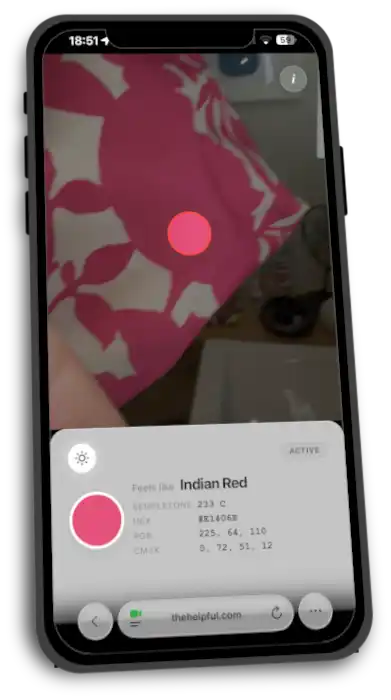
I built the Color Sampler to bridge the gap between the physical world and your digital workflow. It is a completely free, browser-based tool that uses your device’s camera to identify, match, and convert colors instantly. Whether you need a Hex code for CSS, CMYK for print, or a standardized spot color, this tool puts the data right on your screen.
Solving the "Lighting Problem"
One of the biggest flaws in software-based color pickers is ambient lighting. Shadows and warm indoor bulbs can drastically skew color readings, turning a vibrant Royal Blue into a muddy Navy.
To solve this, I updated the Color Sampler to access your device’s built-in LED flash/torch. By illuminating the subject directly with a white light source (your phone's flash), the tool reduces environmental noise and provides a significantly more accurate reading. This gets you much closer to the results of dedicated hardware sensors.
Key Features & Outputs
This tool doesn't just 'see' color; it translates it into the languages used by professionals:
- Hexadecimal (Web): Instantly get the #RRGGBB code for use in HTML, CSS, and digital design tools such as Figma, Affinity or Photoshop
- RGB (Screen): The standard Red-Green-Blue values for video editing and digital displays
- CMYK (Print): Automatic conversion to Cyan-Magenta-Yellow-Key values to help estimate how a color will look on paper
- FREETONE (ink-matching guide): A high-fidelity, free alternative to the proprietary Pantone matching system. This helps you communicate specific ink colors to printers without needing a license
- Human-readable: It also gives regular, readable color names as well, which are certainly easier to remember than #a0d321 or 4157C!
Hardware vs. Software: The "Good Enough" Sweet Spot
I recently saw a commercial advertisement for a pocket colorimeter retailing for hundreds of dollars. While dedicated hardware will always have a slight edge in calibration, the Color Sampler offers a "pretty damn good" alternative for 99% of use cases—at zero cost.
By leveraging modern browser APIs and the high-quality sensors already built into smartphones, we can achieve professional-grade utility without the extra dongle.
How to get the best results
- Grant Permissions: Allow the browser to access your camera
- Enable Flash (optional): Tap the ‘sun’ icon to turn on your device's torch for consistent lighting
- Center the Target: Aim the center box at a solid patch of color
- Lock & Save: Tap to freeze the color sampling process so you can copy the color values or simply take a screen grab of the display